
- Engineering approves
Record the effective revision
- Catalog editors update
Review material fields, images and documents
- Quality reviews the lot
Identify the revision used for that production run
Build a record engineering and buyers can both use
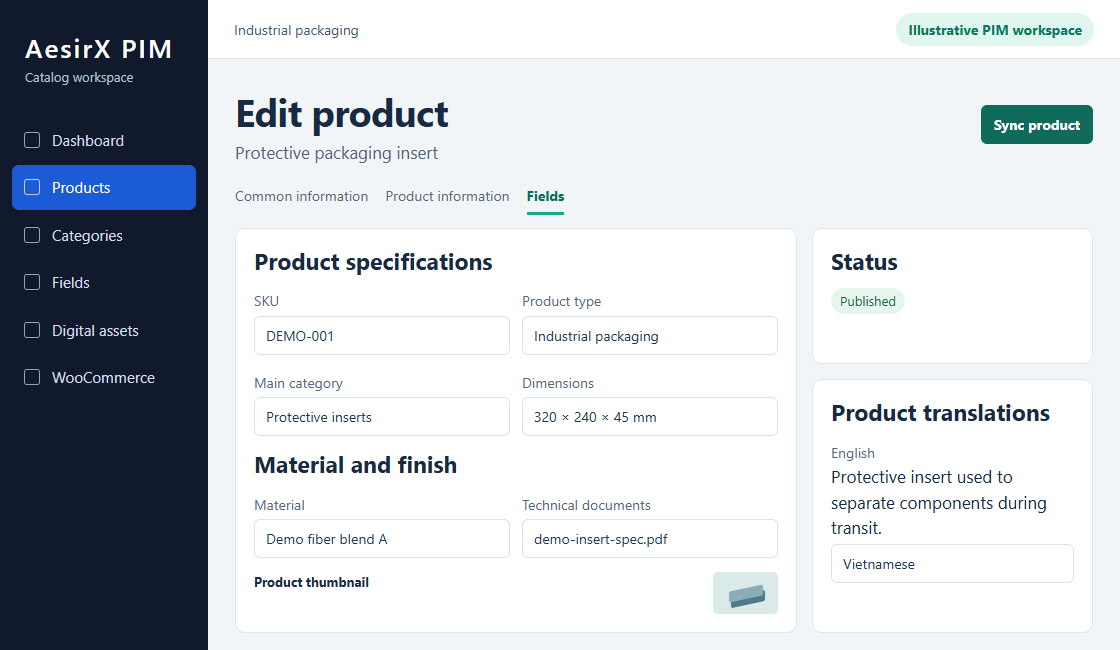
A technical buyer comparing protective inserts needs the outside dimensions, the unit and material grade. An engineer needs to see which specification sheet those facts came from. In AesirX PIM, use a product type and field groups to keep those details available across comparable products. Add an image for identification and link the relevant technical sheet so a reviewer can check the source before publishing.
| Product family | Fields worth agreeing first | Who checks them |
|---|---|---|
| Protective packaging | Outer length, width and height, material, and application | Engineering checks the dimensions and material, while the catalog team checks the image and buyer-facing terms. |
| Industrial components | Model or drawing reference, mounting dimensions, finish, and compatible equipment | Engineering confirms fit information. The distributor-facing team checks compatibility wording and supporting documents. |
| Packaged goods | Net quantity, package format, and relevant label artwork | The product and labeling teams confirm the current artwork and market-specific copy. |
These are illustrative catalog models. Choose fields based on the comparisons customers make and the documents your teams already maintain. Fields and field groups
Put a specification change through review
- Engineering approves the change. For an illustrative protective insert, the material changes to a different fiber blend while the exterior dimensions stay the same. The team records when the new specification takes effect.
- Catalog editors update the material field and the current specification sheet in PIM. They review descriptions and images for anything the change makes inaccurate.
- Quality and production record which revision is used for each lot. A product page can show the current spec while a quality reviewer still needs the version used on an older run.
Use the same handoff for one real workflow with company details removed. Notice where teams currently copy values or search for a version manually. Those steps give you a basis for evaluating whether the catalog model saves time.
Decide when quality evidence needs its own workflow
When a customer asks whether a component fits, the catalog record can supply dimensions and a technical sheet. When a distributor reports a defect, the quality team needs lot, inspection and shipment evidence. ComplianceOne’s Product Quality and Traceability overlay supports organizing that evidence. The planned link from PIM would help a reviewer locate it using the product reference. Manufacturing traceability integration
What to bring to a manufacturing demo
Start with a sanitized catalog record, its current specification sheet and one change your team had to communicate to a distributor or buyer. Bring the field names, units and language versions you maintain. That lets the demo focus on the product editor and document handoff your team would actually use. Request a manufacturing demo